Course 80295A Extending MS Dynamics CRM 2011

An an update to my earlier post about the official MOC courses available for instructor-led training for CRM 2011, I have just found that the details of the course “Extending Microsoft Dynamics CRM 2011” have now been released, although the course itself won’t be available for another week or so. The course page is here:

MS MOC course 80295A Extending CRM 2011

This will be a three-day course as expected, and includes lots of topics such as:

  • querying CRM by various methods, including LINQ queries, FetchXML and OData,
  • developing custom workflow activities and plug-ins,
  • application events and the xrm.page model
  • customising the Ribbon
  • publishing web resources including Silverlight applications

No news on a release date for the related exam yet, but of course lots of people want to go get the training in order to be able to bring their skills up to date for actually getting on with the job of developing for CRM 2011, and not necessarily in order to pass an exam.

(and for fellow MCTs, yes, this course is available in the download centre so you can start preparing)

CRM 4 MCITP Certification tracks updated

The exam requirements to become a Microsoft Certified IT Professional (MCITP) in Applications for Dynamics CRM 4.0 have been updated slightly. Now you will be able to take (or use an existing pass in) exam 70-680 Configuring Windows 7 instead of the out-dated 70-620 Configuring Windows Vista Client. Hurray!

Dude, where’s my transcript?

The only strange thing here is that whether you have already passed this exam or take it now, it won’t count towards making you an MCITP on CRM 4 until September. Why would that be? Answer: because internally at Microsoft Learning, the matrix of which exams count towards which qualifications is handled by the Transcript Database, and there is a planned update to that taking place in September.

This means that any exams you take now which are not already featured in the database / matrix simply don’t count towards anything, and will not show up on your official MCP / MCT transcript that you can access through the Microsoft Professionals portal or share with anyone else. Essentially, you can’t prove you have passed any of the new CRM 2011 exams, for example, because they don’t have a pigeonhole for that yet, so “computer says no”.

Update October 2011: They have fixed one part of the transcript database so it does at least show up the exams you have passed, but for MCTs it is still frustrating as the whole Dynamics range of products is shown in strange ways. I can apparently teach subjects in which I have no knowledge at all, while on the other hand I can’t cover courses for which I have passed the relevant exam. Hopefully this will be largely resolved when they finally release the requirements for the CRM 2011 tracks.

What about the tracks for installers and developers?

While this is only a small change to the Applications track, I wonder if this is a sign that the other tracks will follow, such as allowing exams in Exchange 2010 rather than 2007 for the Installation track.

This also bodes well for the MS Dynamics CRM 2011 Certification Tracks and Exams which look more likely to use current versions rather than older ones, which will make them more relevant and achievable for a longer time into the future.

Update October 2011: Yes it was a sign of further changes! The Installation and Deployment track now includes 70-432 (SQL Server 2008 Implementation and Maintenance) and 70-431 (SQL Server 2005) as an elective alongside the Exchange 2007 and Windows Server 2008 exams. This looks promising for people wanting to qualify as an IT Pro in CRM 4 using 70-432 and being able to count this towards CRM 2011 too (but not the SQL 2005 version which is not supported for CRM 2011).

Does this change make anyone out there an MCITP in Applications or Installation who was not already? What other exams do you think should be included as electives for the CRM 4 or 2011 tracks? Let us know your thoughts in the comments.

Advanced Office Documents 2010 Edition by Stephanie Krieger

It took me a while to realise that when Stephanie Krieger said her new book was on the way, it was not necessarily going to be published under a similar title to her previous one “Advanced Office Documents 2007 edition”, in the MS Press “Inside Out” series.

So I’ve only just got round to finally ordering Documents, Presentations, and Workbooks: Using Microsoft Office to Create Content that gets Noticed which is the updated version.
Not the snappiest of titles, and if it is anything like her last it should have really been called something like “How to make Office 2010 really rock”.

I’m hoping it will be as brilliant and have the same deep content as the previous one, which certainly taught me loads about the packaging and XML structure of the new document formats, as well as some great stuff about using content controls in Word. If I get time I’ll do a proper review when I’ve worked my way through it.

PowerPoint presenter view smarter with sp1

PowerPointOnce you install Office 2010 service pack 1 then PowerPoint presenter view gets a bit smarter about how it choose which screen is used for the presenter’s “dashboard”, and which shows the slides for the audience.

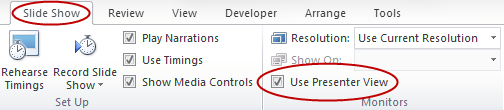
With sp1 installed, when you select “use presenter view” on the Slide Show tab of the Ribbon, whichever monitor is set to be your main display (the one with your Start menu and Taskbar on) will be assumed to be the one the presenter is looking at, while the slides will go on your second monitor.

PowerPoint Slide Show Ribbon tab - Presenter View option

This is usually the right decision and is much more likely to result in you getting the setup you need “right first time” without having to fiddle about to choose the right monitor from the list (although you can still select this by hand if you need to override the automatic choice, of course).

Office 2010 Service Pack 1 – sp1 download available

Office 2010 logoLast month I wrote about the planned availability of Service Pack 1 for Office 2010 and SharePoint 2010 for the end of June. And it’s here!

You can now download the whole service pack file as a self-extracting executable and simply run it to install, or you can use Windows Update, where it is listed as an Important/High Priority update (rather than critical or security) for you to manually install (after 90 days this will change to an automatic update if your system is configured for that). At the moment my 32 bit install claims this would take 409 MB via Windows Update compared with only 361 MB for the full exe package download.

Even if you only have 1 machine to do, you will save marginally on the file size if you manually download Office 2010 sp1, and then of course you will have the file to use again on any other machines that need it – if like me you are the de facto IT support for family and friends, this can be quite useful.

A few key changes relating to other products are that Outlook 2010 sp1 will fully support the now-released Office 365 online business applications suite, while SharePoint 2010 will support SQL 2011 and has improved support for users of Internet Explorer 9.

So, there’s lots of information about this important update, as well as the downloads themselves, so let’s dive straight in with a load of links to the things you probably want to get hold of straight away.
Find out more about Office 2010 and SharePoint 2010 service pack 1 downloads, resources, and information »

New micro-site for all Microsoft Certified folks

MCT logo mediumMCP RGB logo white borderMOS Master medium white

Microsoft Learning have launched a new central certification website for all your needs as a Microsoft Certified Professional, Trainer or Office Specialist:

http://www.microsoft.com/learning/members/

This is essentially a starting point: at the top of the page you will see “tabs” for each the three different branches’ own micro-sites. This provide more consistency between the three sites, as well as making sure that you can easily take advantage of all offers, discounts or services which apply to your particular specialist area or areas.

From what I have seen of the MCT and MOS ones (which I am most interested and involved in) they are great little pages full of all the links you need to all the resources you want, and some that you may need and did not even know about.

Included are links to the logo builder pages, how to download or order a certificate, create an online virtual business card or update the profile information which Microsoft holds about you (including which newsletters and updates you receive by email).

This is not a replacement for lots of the resources which already existed, such as Born To Learn, or the MCPeStore, or to view or share your transcript; rather it is a single page to go to which brings links to all those resources together in one place.

Don’t overlook the links at the top of the page directly below the tabs (you can get to these by hovering over each tab, or once you have clicked on a tab the ones for that section stay visible.

If you have ever passed a Microsoft exam and want to continue certification as part of your career or personal development, go and check out the Microsoft Certified Members’ site today.

MS Dynamics CRM 2011 MOC training courses

MS Dynamics logo

Update Feb 2012: I’ve written a much newer article bring up to date all the information about Microsoft Dynamics CRM 2011 training courses and exams in one place here: CRM 2011 Training Update 2012

As a follow-up to my previous post about the new Dynamics CRM 2011 exams and certification tracks, this article describes the official courses available to help prepare you for gaining CRM 2011 certification, or upgrading your skills from a previous version, or simply to find out more about the software to help you do your job without actually taking any exams.

All the courses described below are available now on the courseware download library (for MCTs) and on PartnerSource (for suitably certified MS Partners), except where stated.

Microsoft Official Courseware (MOC) courses for CRM 2011

Although there are four main exams (Applications, Customization, Installation, Extending) there are many more courses, some of which are already released, others around the corner. All of these are discussed in this article. Find out about MOC courses available for Dynamics CRM 2011»

MS Dynamics CRM 2011 Certification Tracks and Exams

MS Dynamics logo

Update Feb 2012: I’ve written a much newer article bring up to date all the information about Microsoft Dynamics CRM 2011 training courses and exams in one place here: CRM 2011 Training Update 2012

I see lots of people asking about the CRM 2011 certification track, exams and courses and although most of this information is available, it is not very well linked together. So, to try and get things straight and written down in one place, here’s my take on “how to get certified in CRM 2011”.

Individual CRM 2011 exams

There are three core exams already available for CRM 2011, very similar in concept to their 4.0 equivalents, and the details of what is required for each one are on these pages (and their various tabs for skills measured, preparation materials etc):

MB2-866 – Microsoft Dynamics CRM 2011 Customization and Configuration

MB2-867 – Microsoft Dynamics CRM 2011 Installation and Deployment

MB2-868 – Microsoft Dynamics CRM 2011 Applications

The fourth exam “Extending Dynamics CRM 2011” is not yet available, but it is planned for release in August, and I’ll update this page once details are up on the Microsoft Learning website. Update: the details for Course 80295A Extending MS Dynamics CRM 2011 are now available.

Read more about the available certifications for CRM 2011 and what you need to pass to achieve each one»

SharePoint and Office 2010 Service Pack 1 announced

Office2010Logo_small

The Office Sustained Engineering blog has an announcement that Service Pack 1 for Office 2010 and SharePoint 2010 is on track for release at the end of June.

As you might expect, this will include a roll up all previous patches and cumulative updates, as well some minor feature changes.

Update 28th June 2011: It’s here!

Read all about it and find links to all sorts of information and resources: Office 2010 sp1 available for download

Change to Outlook reminders dialogue

One of the changes declared for Service Pack 1 will be to revert the behaviour of the reminders window in Outlook 2010 back to the way it worked in 2007 thanks to sustained pressure from various contributors on the Microsoft Answers forums.

In Outlook 2007 when you snooze a reminder it remembers how long you snoozed that item for, and next time it comes up that is the default time chosen so you can very easily hit snooze again for the same delay. Each item (calendar entry, task or follow up) remembers it’s own interval so you can snooze a meeting later today maybe 15 minutes at a time, but a reminder about a conference next month a whole day at a time.

Outlook 2010 changed this behaviour so that each time you snooze any item, the time interval chosen is remembered for the next item as well, which means some people found they had to keep changing this back and forth between different values, and might snooze something for too long without realising – possibly ending up being late for that important meeting for example. Service Pack 1 will switch this behaviour back to the 2007 method, and it sounds like this will just happen, rather than providing the user with any option to choose which approach works better for them.

Which way would you prefer this to work? Let us know via the comments.

No news on Outlook 2010 holiday errors

For over a year now people using Outlook 2010 have been able to add public holidays for their country, with the slight problem that many of these holidays have several errors in at least 23 countries around the world . I have actually seen some people report the problem and offer fixes for it which still contain some of the incorrect dates, or “corrections” which introduce different faults.

Hopefully Microsoft will stick to their plan of including fixes in the service pack to finally address this problem, but there is no detail available on this yet, but we’ll update this with any news when it arrives.

Producer for PowerPoint

PowerPoint 2010 logo

The Microsoft Office blog has an article about Producer for PowerPoint, as well as links to the download page, and importantly to the Office Animation Runtime which you will need if you have PowerPoint 2010 (previous versions installed this along with the application, whereas 2010 does not). What is strange here is that the download page describes this as version 2 with a release date of 29th April 2011, yet the actual download page and file is identical to the version released and announced at the beginning of May last year.

The previous release was really a bug fix version which sorted out compatibility for Office 2007 and 2010, and there were vague claims that there would be new features in some later release, although as always according to policy there were no specifics about software in development.

Producer is a great way to turn a presentation file into a polished multimedia show which anyone can view using their browser. This is great for e-learning, tutorials, or any situation where you want to take something which would normally be delivered in person and make it available to a wider audience.

Oddly enough the download page refers to this as version 2, but the program itself claims (through help > about) that it is build 3.0.3012.0, but the MD5 hash for this file is identical to the year-old one. I’ve had a couple of problems with it – for example if you delete a load of slides from the timeline it expands the last one to fill up the space, and when you try to shrink it back down it takes while for no obvious reason, in my case chewing up one of my four processor cores flat out for a couple of minutes (tip: only add slides when you know you need them rather than all at once to avoid this problem).

Microsoft increasing exam prices on July 1st 2011

Microsoft will be increasing the cost to take any of their technical or developer track exams worldwide on July 1st, the first increase for several years. This change will affect pretty much all their exam tracks except for the top-tier MCM and MCA, the Microsoft Technology Associate (MTA – aimed at school and college students mainly), and the Microsoft Office Specialist (MOS, currently managed by a different exam provider anyway).

In the UK this means an increase from £88 to £99, so if you want to save that extra £11 then get your exams done before the end of June. Both of these prices are ex-VAT, so for those of you paying your own way through a certification track that means you will need to find an extra £13.20 from your own pocket, or £15.40 more than a year ago thanks to the VAT increase as well. If you already have pre-paid vouchers which are still valid, you should be able to use these for some time, but read the small print on the page linked below.

More information on prices for other countries, details of voucher eligibility and plenty of FAQs on the Microsoft page about the exam price rise.

UK MCTs will have already seen that their exam discount will increase at the same time by 5% which takes out a lot of the sting here, but early adopters in the training community will no longer get the super-bonus discount for taking exams within the first 90 days of release, which is not such great news.

Using PowerPoint Presenter View to help deliver Great Presentations

I am frequently amazed by the number of people who I meet in my training sessions who use PowerPoint as a key tool for their jobs, regularly stand up and present to groups of customers or colleagues, and have never even heard of Presenter View, let alone used it.

What does Presenter View offer?

Presenter View has been available in PowerPoint for nearly ten years, and allows you (the presenter) to see much more than the audience. Specifically, you will be able to see on your screen:

  • the current slide exactly as the audience see it (and which stage of “building” the slide you are up to)
  • your speaker notes to remind you of important points to say, and other facts to refer to in answering questions
  • all of your slides (including hidden ones to remind you they are there), shown as a series of thumbnails across the bottom, rather like a film strip (down the side in 2002/3)
  • slide <number> of <total slide count>
  • the elapsed time
  • the time of day (2007 onwards)
  • access to tools such as pen and highlighter to draw on screen and annotate slides on the fly, again without turning around (2007 onwards)

This means that you can sit or stand facing your audience without needing to keep turning around to see the screen to know where you are up to (or far worse, to read it out to your audience). It can also help you to follow good practice and avoid including lots of things on your slides to remind you what to say, by making everything easily available in your notes section. This means you can remove lots of the words from your slides – or perhaps all of them, using only a picture to illustrate your topic.

Read more about using PowerPoint presenter view to present like a pro»

Stephen Few Information Visualisation Workshops in London July 2011

If your job involves any kind of data visualisation from simple Excel charts to fully interactive management dashboards, you need to make sure that the way you display your data is as clear, unambiguous and effortless (to produce and to interpret) as possible.

Last year I attended three days of workshops by one of the foremost proponents of best practices in information visualisation, Stephen Few, founder of Perceptual Edge. Although I already had two of his books and had devoured their contents, there’s nothing like in-person training to highlight the most important ideas and make them stick. If you missed out last time around, Stephen is back in the UK from 6th to 8th July 2011, and in Vienna from 5th to 7th October.

In between interactive question and answer sessions, and some individual and group workshop time there was plenty of explanation of current understanding of how the human brain works to interpret visual displays of data. This combination of applicable, real-world best practice, backed by solid theory and research is a sound approach to take – you want to know that the ideas and principles under discussion are not just one person’s strongly-held viewpoint, but demonstrably better for interpreting, analysing, understanding and communicating your business or research data.

I already used many of the techniques which were discussed, and even teach others how to achieve these in practical situations, such as using workarounds to get Excel to do some pretty advanced chart displays, get better reports out of Dynamics CRM, and use clear visualisations when producing presentations. I still learned a great deal though, and came away from these workshops with a much clearer set of tools to explain to people how to better understand the information in your data (for analysis and decision making) and communicate this to others clearly (for reporting or dashboard style displays).

Stephen Few has many years of experience in this field, both in academic circles (he teaches in the MBA program at the University of California) and with businesses and corporations in many different industries. His mastery of the subject, leisurely delivery and down-to-earth style made these workshops as enjoyable as they were educational.

The three workshops (which map closely in content to three of Stephen’s books) are:

Show Me the Numbers: Table and Graph Design

Dashboard Design for at-a-Glance Monitoring

Now You See It: Visual Data Analysis

I highly recommend you to go on whichever of the three is most directly applicable to your role, or better still to do all three to get a fantastic all-round understanding of different aspects of this subject. You can find out more from marketingQED who organise these events over here:

Stephen Few: Information Visualisation Workshops 2011

If you can’t get to all three days, or want to do some prior reading, take a look at Stephen’s books here (note, the courses themselves each include a copy of the relevant book to take away, so you might not want to get them before attending unless you know someone who would love to take a copy of your hands afterwards!):

Amazon.co.uk – books by Stephen Few

Windows 7 Service Pack 1 arrives to little fanfare

Maybe it’s just me, but the release of service pack 1 for Windows 7 ought to be a fairly big deal, but because this release coincides with sp1 for Server 2008 R2, the message seems to been a little lost and garbled.

In a TechNet flash email I received this week, entitled “Windows Server 2008 R2 and Windows 7 SP1 Arrives” the only reference to a service pack was this:

“Windows Server 2008 R2 with Service Pack 1 is ready with new virtualization tools, web resources, management enhancements, and Windows 7 integration.”

Not a resoundingly clear message about Windows 7 sp1 availability. So I checked my Windows updates which had a handful of Office things, the usual Malicious Software Removal tool update and a couple of vaguely worded items which I included as well. No service pack to be seen. Next step, search engine!

Read on to find out how to download and install Windows 7 service pack 1 (fairly) painlessly»

Exam objectives for MOS 2010 exams are now available

If you are interested in Microsoft Office Specialist 2010 certification, you may be interested to see that the full exam objectives have now been published for the various MOS 2010 exams, including the expert level ones for Word and Excel. Some of these exams are not yet released (such as SharePoint, due in June 2011), but by knowing the objectives which will be tested you can start to put together your training plan.

Subject Exam number and link
Word Core 77-881
Excel Core 77-882
PowerPoint 77-883
Outlook 77-884
Access 77-885
SharePoint End User 77-886
Word Expert 77-887
Excel Expert 77-888

I passed the Excel 2010 exam during a break at a conference last year, but I’ve been waiting for the Expert level exams to come out so I can go and do the Word and Excel Expert ones as well as Outlook and PowerPoint in a single day to get them all done at once for my MOS:Master certification. This is what I did for my MOS 2003 and similar to MCAS 2007 (when I did Vista as well, but there were no “expert” exams for 2007), and I just find it the best way to “blitz” them and get them all passed in one go.

(Just in case anyone missed it by the way, the Office exams are now back to the “MOS” branding rather than MCAS, and anyone with an MCAS 2007 certificate is retroactively awarded a MOS 2007 in its place.)

Good luck to anyone planning to take these; let me know in the comments how you get on!

Outlook 2010 has incorrect holidays for UK and many other countries

Quick background information to bring you up to speed: You can add national holidays for your country to your Outlook calendar so they remind you not to go to work that day. Unfortunately Microsoft sometimes get the details wrong for one or two places, but in the case of Outlook 2010 at least 23 countries have incorrect dates for some of their holidays.

In this article I will describe some of the errors, list corrected dates and provide links to files I have prepared with the fixes already in to save you some typing. I have also posted a separate article about adding and removing holidays from your Outlook calendar, rather than making this one even longer with a great big discussion about the mechanics of doing this.

Background

When you add holidays to Outlook, they are read in from a specially formatted text file, formerly outlook.txt, now (since 2002?) renamed to outlook.hol but essentially the same thing. This contains sections for various countries and a couple of religions, so that you can easily choose the ones you are interested in. This approach has a couple of limitations but some upsides too:

  • each holiday is specified as a single date, so even things which have on obvious recurrence pattern must be included several times for different years, which means only a limited number are included in the interests of file size
  • it is hugely subject to human error, as we will see
  • when there are errors, at least you can easily fix them by editing the file or replacing it with one someone else has done (like me)
  • you can add extra sections for “countries” you want to include, such as for a special interest group, or additional company holidays (such as winter shutdown periods)

Outlook 2010 errors

The version of the outlook.hol file which shipped with Outlook 2010 final version (RTM) has some serious flaws in it, affecting at least 23 countries as far as I can see (basically most of Europe as well as Australia and New Zealand), and likely many others I have not been able to identify. As I mentioned above, because of the way this file is used, this is relatively easy to fix as it is not an actual bug in the program, but is still very annoying, especially for anybody that has already imported the incorrect holidays.

Read more of this post

How to add national holidays in Outlook 2010

You can easily add national holidays to your calendar in Outlook to make sure that you don’t forget those extra days when you don’t need to go to work.

Before you do though, it is worth noting that Microsoft have published a whole bunch of wrong holiday dates in Outlook 2010 for at least 23 countries, including many future UK Bank Holidays. You should probably read my other post about the errors and download one or more of the files with corrections for them before you go ahead and add anything.

This article is intended to help you add national holidays, remove holidays with an incorrect date, and use Outlook categories to make these stand out on your calendar. Although I wrote this to accompany my post about incorrect dates in 2010 to show you how to actually add or remove these from your calendar, what follows applies pretty much the same to Outlook 2007 and older as well, although to be fair I have not attempted to test this in any step-by-step fashion for Outlook 2003, 2000, 97 or older as I no longer have these antiquated, steam-driven versions installed for me to access.

Adding Holidays to your Outlook 2010 Calendar

The normal way to add these holidays from the outlook.txt or outlook.hol file already installed on your machine is through Outlook’s own options as follows:

In Outlook 2010 go to File > Options then click the Calendar tab on the left, then click then “Add Holidays” button and carry on as described below.

If you are still using an older version, then for Outlook versions up to 2007, go to Tools > Options, then on the Preferences tab click on the “Calendar Options” button, then click on the “Add Holidays” button in the middle of the dialogue box which appears.
Read on to find out more about adding and removing holidays from your Outlook calendar»

Annoying file format warning when exporting CRM records to Excel

Pointless error message dialog box

When you export from CRM to Excel the data is derived as XML, saved with an XLS file extension and Excel is invoked to open the temporary file. Unfortunately Excel checks to see if the file being opened is actually of a type which matches the file extension and tries to be helpful. Normally this is to help overcome problems such as a comma-separated variable (CSV) file being saved as an XLS file extension, which ought to mean Excel tries to read the XLS file, fails because the contents are nothing like a real Excel binary file and gives up. Instead, Excel actually looks at the content, spots that it looks very much like a CSV and allows you to open it just as if the file extension was correct in the first place. However, this cleverness is tempered somewhat by the fact that the default setting for this is to ask the user every single time what they want to do.

As always, this is probably intended to be a helpful warning and prevent people opening files which might have insecure content, but it fails to do so because most users do not understand the implications and the longwinded message is probably not even read properly anyway. Certainly the 50th time someone sees a dialog like the one below, they just click “yes” without reading and it no longer provides any benefit whatsoever (by the way, I have done nothing to this, it displays in this ridiculously wide, un-resizable window on my machine).

Click to see larger version - CRM Excel export error message

Whenever I have managed people in IT support roles I try to eliminate fixes which involve things like “ignore that error message, just hit OK and it will work fine”. This not only numbs people to the meaning of that particular error message but to these sorts of warnings in general. Too often I have heard users explain why they did not report a problem until it was too late, saying “well, I got an error every day saying something about faulty disk or something but I just clicked OK, like John said we should with that other one…”. Find the root cause, eliminate the error, or suppress the error somehow, don’t teach people that errors don’t matter or they just ignore them. If you went to your doctor and said “it hurts my neck when I lift my arm up” you would not be impressed if she replied “then don’t lift your arms up!”, would you?
Read on to find out how to stop Excel asking unhelpful questions when you export records from CRM»

Outlook client for CRM 4 with rollup 10

MS Dynamics logo

Finally Microsoft have released a client installation package with a recent rollup already included in the package (“slipstreamed”). Unfortunately, nearly 4 weeks after the release of update rollup 11 it is only rollup 10 that is included. While this is a move forward from the rollup 7 client that was available, it still means that most people are going to need to install the client and then immediately apply a patch to UR11, so it is probably of limited help really. Thanks but no thanks.

Get the new CRM 4.0 client for Outlook with Update Rollup 10 if you are using the on-premise or partner-hosted (“service provider”) versions of CRM. If you are using CRM online you are stuck with installing the original version of the special online client and patching it yourself. Note: CRM on-demand from Microsoft is only available in the US and Canada despite the announcement back in April about worldwide release, because it seems that will only be for the next release, version 5 available later this year.

Hat tip to The CRM Business for the original heads-up on this one.

Awesome quick formatting of chart elements in Excel 2010

I just discovered a minor enhancement to chart controls in Excel 2010 that makes a really big difference in terms of how long it takes to quickly add the formatting I need.

When you right click something in your chart you see the usual right click menu as with Excel 2007 but now you also get the floating mini-bar above it as shown below (click for larger version)

Excel 2010 chart formatting mini-bar

On the right hand end of this you can see the selected element (Series 3 in this case) which you can then directly format, but even more usefully, you can use the drop down here to select another element, format that, then another and so on, and the mini-bar stays on top throughout.

Excel2010 chart formatting2

Now of course you can achieve the same thing by selecting elements on the Chart Tools|Layout or Chart Tools|Format ribbons, but for some items like labels and axes you want to change font properties and that means going from one Ribbon to another. If you want to rapidly change the colours or borders of various things, make the gridlines and plot area less obvious, alter the fonts of data labels or axes and other quick changes, you can do all of this without ever leaving this mini-bar area

Read on to find out more about using the mini-toolbar to change chart formatting»