Oops – Microsoft Certificate expired when logging on with Live ID

When signing in to a Microsoft site this evening I received a security warning from Firefox. Strange, I was convinced the site was genuine and I had not followed a spoofed phishing link to get there. How could this be?

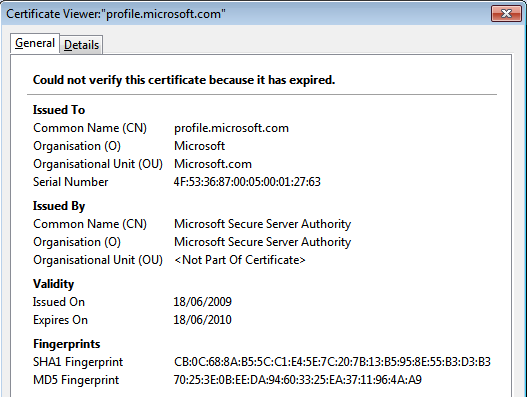
I chose to continue using the “Add exception” button to get to the screen where I could see the certificate details. Nothing wrong with the certificate issue, path and so on, except that it expired a few hours ago at 18:26 GMT:

Expired Microsoft Certificate

This certificate is not actually for live.com that runs the logon part of the process, but profile.microsoft.com which looks after the other parts of the page which wrap round this. So, not vital but likely to cause much confusion and FUD until they get a new certificate to fix the problem.

Do you know when your certificates expire? And all your different domain names? What about other vital contracts which would stop you doing business if they expired suddenly? How do you manage all of these; is it a central business policy or does it just come down to one overworked IT Manager’s Outlook calendar?

Office 2010 available worldwide

Microsoft_Office-_2010_Logo

Businesses have been able to get their hands on Office 2010 through various licensing options such as Software Assurance for just over a month now, and system administrators may have begun testing, rolling out and managing their new Office 2010 estate. Now the rest of the world can catch up as Office 2010 becomes available through all sorts of channels to purchase as boxed products through high street stores and online retailers, as well as options to download if you really can’t wait for the postman.

Eric Ligman has a great page about Office 2010 with lots of links to more information, documents, videos and the Office team blog. Really useful stuff all put together in one place for you to help you find out about the new features in Office 2010, decide if you should upgrade, and choose the right version for your needs.

Stephen Elop, president, Microsoft Business Division said:

Working with major retail partners and PC makers, we’ve made dramatic changes in the way we deliver Office 2010 to give consumers more buying choice, making it easier than ever to unlock the power of Office on new and existing PCs. For the first time, people can purchase a Product Key Card at retail to activate Office 2010 preloaded on new PCs. For those who want to download Office 2010 direct from Office.com for an existing PC, the new Click-to-Run technology will have them up and running in a matter of minutes.

Buy Office 2010 Professional on Amazon.com

Microsoft Browser Choice screen rant

I know this is old news, but it still annoys me. Just for those who have not heard, this useful summary of the legal background to Browser Choice (rather than the technical details) describes the decision:

In December, the European Commission and Microsoft arrived at a resolution of a number of long-standing competition law issues. Microsoft made a legally binding commitment that PC manufacturers and users will continue to be able to install any browser on Windows, to make any browser the default browser, and to turn access to Internet Explorer on or off. In addition, Microsoft agreed to use Windows Update to provide a browser choice screen to Windows users in Europe who are running Internet Explorer as their default browser.

So, when I install shiny new Windows 7 machines for my clients with a perfectly serviceable browser (IE8) with some great security features such as protected mode, I make sure the Windows Update has brought everything up to date and BAM! An icon appears on their desktop and prompts them to choose what browser they want.

So I choose IE, delete the icon and everyone is happy.

This is a complete waste of everyone’s time and money. The users who want an alternative still go and download the browser of their choice. Most don’t bother. Making a bad choice from the popup screen and deciding a while later you want to switch, or revert to IE is just a waste of people’s time, and in business this time will cost money. Across Europe this hidden cost will be huge.

Read more of my rant about the Browser Choice screen»

Usual CRM Update – Rollup 11

Roll-up, roll-up, read all about it. Yes, the usual updates for Dynamics CRM 4 have been released and you can download the components and versions you need from this page. The knowledgebase article kb981328 has the detailed information about Update Rollup 11 for Microsoft Dynamics CRM 4.0, including the prerequisites:

You must have Microsoft Dynamics CRM 4.0 installed to apply this update rollup. Update Rollup 7 is a prerequisite for Microsoft Dynamics CRM for Microsoft Office Outlook and Microsoft Dynamics CRM Data Migration Manager.

Update Rollup 1, Update Rollup 2, Update Rollup 3, Update Rollup 4, Update Rollup 5, Update Rollup 6, Update Rollup 7, Update Rollup 8, Update Rollup 9 and Update Rollup 10 are not prerequisites for the server section of Microsoft Dynamics CRM.

Additionally, you must have Microsoft .NET Framework 3.5 Service Pack 1 installed to apply Update Rollup 11. To obtain Microsoft .NET Framework 3.5, visit the following Microsoft website: Microsoft .NET Framework 3.5 Service Pack 1 (http://www.microsoft.com/downloads/details.aspx?FamilyID=ab99342f-5d1a-413d-8319-81da479ab0d7&DisplayLang=en)

Note that for the server component there is no prerequisite, this rollup can be installed on a base installation (plus MUI if you have multiple languages installed). For the Outlook client you need rollup 7 (same goes for the data migration manager), and for new client installations you can just install the Outlook CRM client with rollup 7 already slipstreamed in. I must admit I find it annoying that the client install is not set up with a proper manifest to trigger UAC elevation – you have to remember to do “run as administrator” (if you are not using the deployment management tools, as many small businesses may not bother to do). The fact that programs prompt me rather than having to remember to do this is one of the reasons I like UAC (since I never run my client machine with local admin rights).
Read about UR11 highlights and the (old) new help files»

Positive Advice for 2010

Susanne Dansey of Purple Cow Ideas Management has created a great Slideshare presentation with insight from a whole bunch of people from all sorts of backgrounds, with a range of skills and experience in different fields. She has collected their thoughts about the last year and their visions and advice for 2010. It’s an intriguing cross-section of quotes, perspectives, and inspiration for anyone in business, and maybe for your personal life too.

(Ideally view it full screen to avoid the jagginess in some of the fonts at the reduced size in the window here)

This also contains some great examples of varied slide layouts and clean lines, it’s worth a look just for some inspiration to brighten up your next presentation.

Find Office 2010 features in the Ribbon

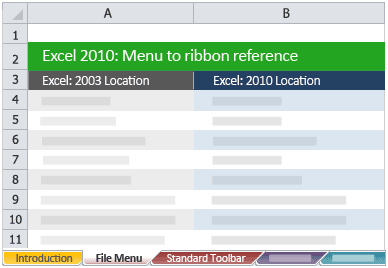
Excel Menu to Ribbon reference

One of the issues with any software upgrade is that as well as finding all the new features and getting to grips with them, there is also a certain amount of reorganisation, renaming and generally moving around of menus and toolbars to seemingly more logical places. Never was this more apparent than the complete replacement of the old Office menus and toolbars with the Fluent User Interface and the Ribbon in Office 2007.

The new style Ribbon is still retained in Office 2010, and you can now customise this to suit your own use. To help people who are upgrading from Office 2003 (or those who upgraded to 2007 but still have not got to grips with where everything is) Microsoft have published a bunch of reference documents to help you find Office 2010 features in the Ribbon. These are all presented as Excel templates, so if you don’t already have Excel 2007 or 2010 installed, you will need to use the Excel 2007 viewer discussed here.

Simply download the files you want for the programs you use, save them somewhere on your computer, then double click to open them whenever you find you have lost a function you used to use a lot. Given that most features that were kept in the product from earlier versions through to 2003 did not move around much, you will probably find these references equally useful if you are upgrading from 97 or 2000, say (I suspect if you are just getting round to upgrading from Excel 5 or earlier you might have other things to worry about!).

[Thanks to Daniel Escapa for bringing this to my attention with his post Menu to Ribbon mappings for OneNote 2010]

Have you upgraded to Office 2010 already? Do you have Office 2007? How have you found the transition from menus and toolbars to the Ribbon way of doing things?

Outlook CRM client synchronisation explained

Outlook synchronisation white paper

Another recent find was this page with a link to a pdf file “nuts and bolts” white paper about Outlook synchronisation. This covers the basic concepts effectively, but also drills down into some of the details about how and when exactly the synch process takes place (some things are effectively immediate, others are queued up) This helps answer those peculiar edge-case questions which come up from time to time about what happens if you create a record here, update it there, share it to someone else then delete the original, or mark it as complete, or some other strange scenario. For example:

An E-mail that is deleted in Outlook will not be deleted in CRM at the next Outlook Sync
An E-mail that is untracked in Outlook will be deleted in CRM at the next Outlook Sync if the user designates

So you can track an email into CRM then delete the copy to keep your mail file size down, and the deletion does not “propagate” to CRM. It is this sort of behaviour which makes perfect sense when you think about the implications, but calling the process “synchronisation” seems to confuse many users as they expect that to mean “keep both copies entirely identical”.

Similarly this table explains what happens when you (or someone else deletes something in CRM which is linked to an item in Outlook:

Entity  Behaviour after deletion in CRM
Contacts A Contact that is deleted in CRM will be deleted in Outlook at the next Outlook synchronization if the Outlook user is not the CRM Owner of the Contact. If the user is the owner in CRM, then the Outlook contact will be unlinked after synchronization.
Appointments An Appointment that is deleted in CRM will be deleted in Outlook at the next Outlook Sync if the Appointment Start Time is in the future.
Tasks A Task that is deleted in CRM will be deleted in Outlook at the next Outlook Sync if the Task has not been completed.
E-mails An E-mail that is deleted in CRM will not be deleted in Outlook.

The distinction between synchronised Contacts I own or do not, Appointments in the future or the past, Tasks which are open or completed, all these details matter in real-word implementations. This document is definitely worth a read, then keep a copy handy for when you need the definitive answer for an awkward situation.

Office 2010 file viewers

Office 2010 has now been released, so inevitably some early adopters (like me) will be deploying this in their businesses. If they are your suppliers, customers, partners or just other folks you know, they might want to share their files with you. So how can you read these documents if you don’t have this latest greatest version yet? There are various free options available to you to view them, depending on which version (if any) of Office you have.

Find out what your options are for different versions of Office»

Quick CRM customisations

I recently found some interesting (and easy) customisations for Dynamics CRM 4 that I though I would share.

Linking to LinkedIn

I’m using Office 2010 with the CRM client installed, and I’m also using the LinkedIn Social Connector for Outlook. I had a few problems at first with Outlook 2010 beta, but a quick uninstall of the social connector component and reinstall or the latest version of the OSC beta as per this Microsoft article did the trick. It’s not something I rely on hugely but it can be handy sometimes. Even more useful would be to get information about my CRM contacts directly. This can be done for Accounts (ie companies) as explained in this article by CRM MVP Marco Amoedo. I must get round to going through the solution to see how it might be possible to modify it for individual Contacts, although I expect getting the results to match the right person might be the tricky part.

Copying addresses from Accounts to Contacts

Maybe you imported a load of data and have Contacts with no address, or you have Contacts who work at sites other than the main head office. Either way it would be great to be able to copy any of the multiple addresses associated with an Account directly to a Contact. I found a nice little solution to do just that on the BusinessNone blog. The html code (which is attributed to Microsoft’s Pierre-Adrien Forestier) needs to be published on your web server then simply called from an iFrame on the Contact form.

This presents all the addresses associated with the Contact’s parent Account so you can choose between them with a click of a button. Note that the “Address name” field is used here to distinguish between the sites. I have often seen this field completely overlooked (or even removed from forms) or misunderstood (being used for the name of the premises or building, or simply the first line of the address). The Address Name is simply “how do you refer to this address?” – head office, New York store, Dallas factory, LA regional call centre or whatever.

Visit this page to download the iFrame source for Address Picker (Ben Vollmer’s Skydrive, Hotmail / Windows Live login required) Note: you need to follow the link to the Skydrive page then download, you can’t right click the link here.

Do you find these useful? Do you have any other favourite quick and easy enhancements for CRM? Let others know in the comments below!

Dynamics CRM rollup 10 and SDK update

Update Rollup 10

First, the obvious regular update. MS Dynamics CRM 4.0 update rollup 10 was announced a couple of weeks ago and the various platform versions and components can be downloaded here. A few minor bug fixes, but this one does not seem to be setting the world alight. Rollup 7 is a pre-requisite as with the last couple; this is clearly seen as the new baseline, but it would be good to see an updated client install package with the rollup already slipstreamed in (as they did with rollup 7). Hopefully for most people it is becoming much more routine to get these rollups tested and installed but it is still annoying for new client installations to have to put the client on and then immediately patch it.

CRM 4.0 SDK version 4.0.12

There is also a new CRM SDK version 4.0.12 available to download, and there are some useful articles about it on the official CRM blog on MSDN and David Jennaway’s MSCRMUK site. Slightly annoyingly the self-extracting CAB file does not have the release version in the filename or in the file version info, it is simply “CrmSdk4.exe” so not obvious which is the latest version when you have multiple downloaded versions lying around. Ho hum, just a quick rename needed.

The xRM stuff is new, there are some Visual Studio templates and CSS stylesheet sample files, but lots of things are unchanged (such as the UX style guide, still on v1.0 from November 2007).

There are some other nuggets too – for example the old dynamicpicklist sample code and documentation has been deprecated and replaced by a newer “dependent picklist” sample instead which deals with three levels of dependency category > sub-category > type and is more robustly written to handle greater flexibility such as non-continuous sets of choices for the subcategories and items which may be available for more than one major category selection.

I also noticed this week there is a “User Interface Integration SDK for Microsoft Dynamics CRM 4.0” for developers writing standalone applications which need to get information to or from CRM, described in the overview as:

The User Interface Integration Software Development Kit (SDK) for Microsoft Dynamics CRM 4.0 is for developers and system customizers who want to build and deploy composite desktop applications based on Microsoft Dynamics CRM 4.0. Composite desktop applications are useful when there is a need to bring information from different systems into a unified application for employee use. This SDK provides an architectural overview, the entity model, and how to register and host applications and workflows in your composite desktop application. Sample code and walkthroughs are provided to guide you through the capabilities.

Changing and managing your Office 2010 product keys

So you got excited and installed Office Professional Plus 2010 or Visio 2010 using your Technet or MSDN subscription and product key? What if you want to change it later?

If you got your keys before 1st May they might not allow you to use all the features of the product as it seems there was some mix up with product keys for Terminal Services rather than full product ones. There’s more info about what you might be missing in Office or Visio in this Microsoft support article and longwinded instructions about how to fix the issue and use a different product key.

Quick version of how to change your Office 2010 key

Via control panel, go to install / remove a program (this called different things in different versions of Windows, but if you have a Technet or MSDN subscription I would pretty much hope you know where this is).

Find the entry for Office 2010 and choose to change the installation (not remove). The very first screen of the install wizard gives you a bunch of options, simply choose the one to enter a product key as shown below:

Read more of this post

Office 2010 launch failure update – working media stream

Tim posted a comment with a working link for the media stream of the Office and Sharepoint 2010 launch.

So far the demo is fast paced and pretty impressive, although resolution of the screen during demo is a bit poor. More thoughts later.

Office 2010 launch failure

Looks like Microsoft are too popular for once, and shot themselves in the foot. The Office 2010 launch which was supposed to be taking place today in 38 countries (or was it 60?) at 15:00 UCT is currently falling very flat as it struggles with the load of too many people trying to see what all the fuss is about.

I am sure Stephen Elop is giving a rousing speech to the several hundred people who have gathered in New York to hear him live, but the “virtual launch” is a big fail at the moment. The links to the live keynote speech media stream are not connecting, the main launch website returns a 503 or a custom “service not available” message.

As an aside, the launch site is running on Sharepoint 2010 – maybe that dog food does not taste so great today.

So far a great product looks like it is being let down by a launch which is going to be an unfortunate flop.

(Update: the main URLs all now seem to be delivering the same pages, but the link to the actual keynote speech still comes up as a dud. Media Player can’t connect to the stream, it seems.)

Office 2010 Group Policy setting reference

There’s a useful Office 2010 Group Policy settings reference which details 428 settings which are new versus Office 2007, 125 deprecated or removed since 2007, and 98 which write to registry locations which are not version specific (and therefore might be policies which affect older and newer versions equally). This is a useful additional companion to the main settings reference (downloaded as part of the Office 2010 admin templates as discussed in an earlier post about managing Office 2010), especially to quickly identify where you may need to make new decisions rather than just replicating your original Office 2007 group policies setting by setting.

Managing Office 2010 RTM

Office 2010 has reached RTM (“release to manufacturing”) stage, and one week from today on May 12th Office 2010 will be available to business customers through Software Assurance they already have on copies of Office, or through new volume licences. (Technet and MSDN subscribers can already download the release version, and anyone can download the Beta to begin familiarising themselves with the new features.

The main (virtual) Office 2010 launch event will include a keynote speech by Stephen Elop, President of the Microsoft Business Division at 11am EDT (that’s 4pm BST for readers in the UK).

System administrators everywhere will also be pleased to find that the associated Office 2010 management tools are available to download already to coincide with the launch, unlike the time lag before they were available for Office 2007, or for the later service packs. This nearly 16MB download is a self extracting exe which will force a UAC prompt on newer OS’s, which can be useful so you can put the files in a folder which needs elevated privileges, and the contents expand to a total of about 123MB.

Read more of this post

Mr. T for a week raising money for Cancer Research UK

Mr T for a week One of the management accountants who works for a client of mine in Leeds has been raising money by being Mr T for a week, all day, every day. I only found out about this when I turned up to do some Excel training for them, even though he has been preparing for this for three months – he has grown a full beard, shaved his hair into that famous hairstyle (inspired by a Mandinka warrior, apparently) and arrives at work every day in combat gear ready for action (and drinks a pint of milk a day!)

The Yorkshire Evening Post has an article about his fundraising stunt, and there are some pictures in this gallery.

Now, since the whole point is to raise money I’m going to “quit this jibber-jabber” and get you to go over to JustGiving and make a donation for Cancer Research (don’t forget to Gift Aid it if you are a UK taxpayer, accountants especially like to keep that cash out of the taxman’s hands!)

http://www.justgiving.com/mrtforaweek

Microsoft Second Shot is back again for 2010

After a very long wait (and some said it might never happen), Microsoft have reintroduced their Second Shot campaign so that you can register to take an exam and if you fail you get a second chance to do a free retake. You register with Prometric,  then they email you a code. You use this voucher code when you register online to take your chosen exam, for which you pay the normal fee (or reduced rate for students, if applicable). Last time round you could not use second shot and a discount voucher (eg one from a Self-paced training kit) since you can only put in one code. Once I actually get a breathing space to take an exam (things are pretty busy right now) I’ll update to let you know if this is still the case.

Offer details:
Dates: January 13, 2010 – June 30, 2010.

Details: You must register, obtain a voucher code, schedule, pay, and take the first and (if necessary) the retake exam before June 30, 2010.

Applicable exams: This offer applies to all Microsoft Learning IT professional, developer, project management, and Microsoft Dynamics exams, including academic exams. Visit the Learning Catalog and search for your next exam

Eligible countries and regions: This is a worldwide offer that is available at Prometric test centers only.

Note Only one Second Shot voucher is available per purchased exam.

Notice that the deadline for taking the first time and retake is the same – June 30th 2010. Previously the first exam had an earlier deadline and the retake had an extra month or so if you were taking one.

Read more about Second Shot »

5 reasons to always put titles on every slide in PowerPoint

I have a golden rule which is that all slides in a PowerPoint presentation MUST have titles, which I mentioned in an earlier post about using large images in PowerPoint. Before I get hundreds of comments saying this is nonsense, and “less is more”, I just want to be very clear: every slide must have a title, they just don’t necessarily have to be visible to the audience.

The minimalist, image-led approach often recommended by followers of Presentation Zen and Beyond Bullet Points (and others) can be very powerful and really help to get your message heard and understood, but people often take it too far and actually delete the title placeholder from their slide, or use the “blank” layout. Even if you don’t want to put words on your slides to show the audience, you should still keep the title, and I’ll explain why and how to achieve this, and discuss a couple of things which might catch you out.

Read five reasons to put a title on every single PowerPoint slide »

Using large images in PowerPoint

One technique for effective presentations is to use large images, especially photographs, with minimal or no text and use these to evoke the ideas you are talking about, or create a connection or emotional response for the audience. On his Slides that Stick blog, Jan Shultink discusses a simple technique to make sure your images have the right proportion and fill the slide which is well worth a read.

Keeping things in proportion

I shudder when I see images that have been pulled and stretched out of proportion, particularly if it is the presenter’s company logo (or worse still that of the audience’s firm, hastily borrowed from their website).
Jan’s tip about dragging by a corner is great for pictures and photos because PowerPoint will assume you want to preserver the aspect ratio, but this is not true for drawings or some vector graphics – a simple hold of the shift key while dragging the corner has the same effect for these files. Note that in both cases, this technique preserves the current aspect ratio, so to get things right in the first place you need to use the reset as pointed out by Jan.

If you are using PowerPoint 2007 or later and you insert a picture from file on a content slide, it will fit it into the content placeholder, so you would then have to expand it up to fit. A quicker way to get it full screen is to make sure to change the slide layout to blank or to title only. Then when you insert the picture it will make it as large as possible while still fitting the whole of the picture on the slide. If your picture is the same orientation (portrait or landscape) and proportion as your slide it will fill it. If it is not then it will still need to be stretched a little to fill the whole slide (this is often the case if you are designing slides for widescreen 16:9 layout and using digital camera pictures which are usually closer to a 4:3 ratio).

Read more of this post

Draft whitepaper about improvements to functions in Excel 2010

I don’t often write posts that simply say “hey, did you see this post over here?”. These echoes in the blogosphere don’t really add much value, and are sometimes symptomatic of people being measured by how many blog posts they write to meet some arbitrary marketing activity metric, rather than adding quality.

(Aside: the same applies to a series of posts about 6 related features of some software or comparing 5 alternative products which would have made much more sense written as a single cohesive article, but failed to tick the box for 10 blog posts per month. You get what you measure, or WYMIWYG)

But today, I though this was important enough to just say – have you seen this post on the Excel Team blog about improvements to functions in Excel 2010? Now that one’s a week or so old now, but today there was an even more important post with a link to a draft whitepaper with more information.

I have linked to the post , not the pdf file directly as it is only a draft, and hopefully the post will get an edit or at least a comment when a newer or final version is available. This document is for those who like to understand the details, and for any sceptics who might say “well, they said it was accurate last time, how do we know it’s any better now?” – it does sound a bit like washing powder ads who always tell us that this time round it will get things even whiter and brighter and cleaner than ever (just like they said before).

There are a couple of typos in the draft (the floor.precise function for example has an obvious chunk of copy and paste from the ceiling.precise function for example), and there are some things not made very clear (for example in most cases it only describes the new behaviour, not the old for comparison or for explanation of the difference and why the new way is more accurate).

It lists the MOD function in the section on functions whose accuracy has been improved. Did you know that MOD gave inaccurate results on older versions of Excel? I didn’t. In fact, it doesn’t – it gives a completely accurate result or fails with a #NUM error if the divisor goes into the number more than 2^27 times as described here. I think this is distinct from being inaccurate in the way the statistical functions have often been criticised.

Similarly the RAND function is listed but its problems not described in any detail – I can only assume that the function is flawed in that it does not give a perfectly even distribution of results and is therefore “weighted” to some extent. Since I only ever use it to produce dummy data for examples used in my Excel training courses, it does not really matter to me if it not truly statistically pure, but I am sure to others it is vitally important what algorithm is used to generate the results (it’s now the Mersenne Twister, for those who care, but this fact is not from the whitepaper, it’s in a comment to the original post made by Jessica Liu).

Anyway, the bugs and inaccuracies that are discussed in the whitepaper are all now fixed (but it does not say this in the whitepaper, merely leaves it implied), and already works in the Technical Preview. Some of the other changes came too late for TP but should be in the public Beta when that gets released.

I expect the changes to naming conventions will also help people who use the statistical functions a lot (I’m not one of those) or have to make sense of others’ work. The convention of .precise added to a function name seems to mean “according to a precise definition” rather than “inherently more accurate”. I would have though .strict might be less ambiguous and similar to the use of the term in other fields (eg web design using XHTML versus XHTML strict).

Has anybody had real issues with these inaccuracies in the past? (and had you even noticed?)

Are you using other software tools to avoid the problem in Excel, and will these changes allow or encourage you to switch back?